Varo’s regular checking and savings accounts connect to Monarch Money directly through Plaid. Varo Believe does not. That means the only workable path is still the old manual flow: download monthly PDF statements, figure out the transaction rows, normalize the amount signs, split secured-account movements from card activity, then build a CSV that Monarch will actually accept.
That is exactly what varo-believe-to-monarch automates. It takes a folder of Varo Believe PDF statements and produces a Monarch-ready CSV in seconds, with both a CLI and a GUI for people who do not want to touch a terminal.
| GUI | CLI |
|---|---|
 |
 |
Why This Needed a Purpose-Built Parser
Varo Believe statements are not simple transaction exports wrapped in a PDF. They have multiple logical sections with different semantics:
- Purchases
- Fees
- Payments and Credits
- Secured Account Transactions
The section itself often determines how the transaction should be interpreted. For example, purchases and fees should be negative in Monarch, while payments and credits should be positive. There is also the messier real-world part: descriptions wrap across lines, rows can span page boundaries, and some data is easier to recover from table extraction while other rows only show up reliably with text parsing.
A generic PDF-to-CSV converter will usually miss rows, duplicate rows, or get the account and sign wrong. This tool is built specifically around how Varo structures these statements.
Features
- GUI for non-technical users with packaged desktop binaries
- CLI for bulk processing of a folder full of statements
- Hybrid extraction strategy using PyMuPDF and pdfplumber together
- Parallel processing with configurable worker count
- Per-file progress reporting during conversion
- Smart amount handling so debits and credits land in Monarch correctly
- Account mapping between Varo Believe Card and Varo Secured Account
- Auto-categorization of secured-account movements as
Transfer - Account Summary output so the balances and credit limits are easy to enter
- Monarch-ready CSV schema without extra cleanup scripts
Installation
Standalone executable
For non-technical users, the easiest path is downloading a prebuilt executable from the GitHub releases page. The repo ships builds for:
- Windows
- macOS Apple Silicon
- macOS Intel
- Linux
On macOS, the app is unsigned, so the first launch requires the standard manual allow flow from System Settings → Privacy & Security.
Python package
pip install varo-to-monarchFrom source
git clone https://github.com/Blacksuan19/varo-believe-to-monarch.gitcd varo-believe-to-monarchpip install .Usage
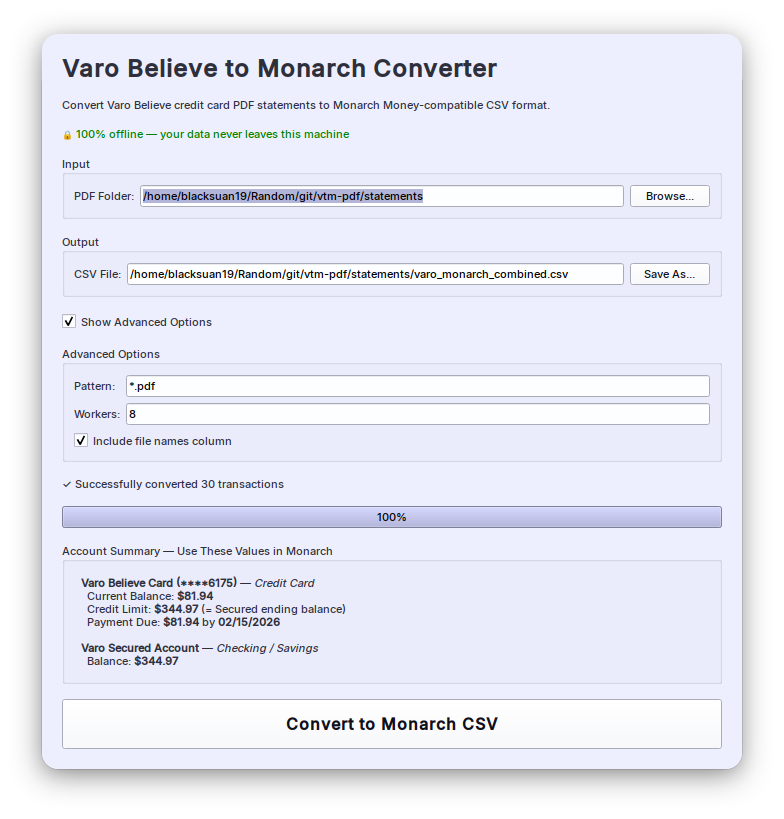
GUI
If you installed the Python package:
vtm-guiThe GUI lets you:
- Select the folder containing Varo PDF statements.
- Choose the output CSV path.
- Optionally set a filename pattern.
- Configure worker count.
- Decide whether to include the source filename column.
Once you click convert, the app shows progress for each file and finishes with an Account Summary panel showing the balance and limit values needed when you create the accounts in Monarch.
CLI
Basic usage converts all PDFs in a folder:
vtm path/to/statementsCommon variants:
# custom output pathvtm ./statements --output ~/monarch_import.csv# process only a specific statementvtm ./statements --pattern "2025-12.pdf"# use 4 parallel workersvtm ./statements --workers 4# omit the source filename columnvtm ./statements --no-include-file-namesThe default output file is varo_monarch_combined.csv inside the input folder.
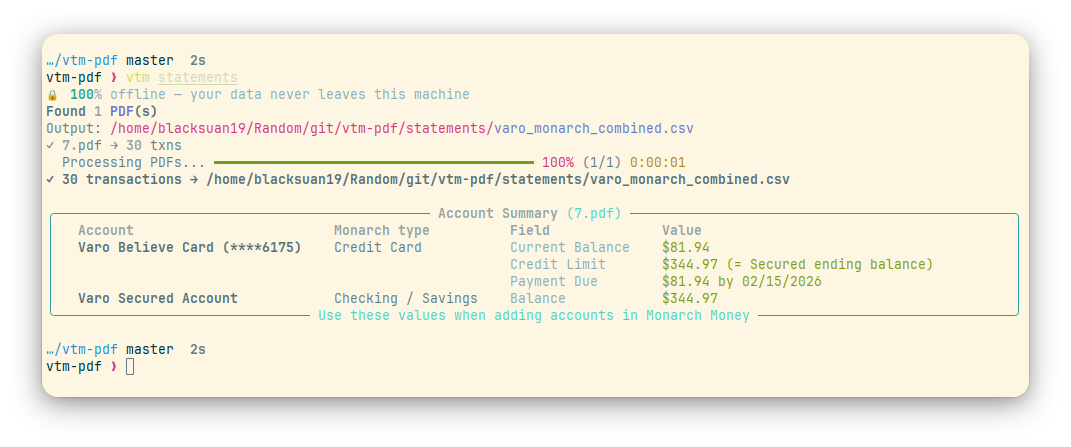
After each run, the CLI prints an Account Summary with the exact values to use
for the corresponding Monarch accounts.
Output Format
The generated CSV matches Monarch’s import expectations:
| Column | Description |
|---|---|
Date |
Transaction date in MM/DD/YYYY format |
Merchant Name |
Full transaction description |
Category |
Transfer for secured-account rows; empty for card rows |
Account |
Varo Believe Card or Varo Secured Account |
Amount |
Signed amount, where negative is debit and positive is credit |
Tags |
Always vtm-import |
SourceFile |
Original PDF filename, unless disabled |
The SourceFile column is useful when troubleshooting or validating imports
across multiple monthly statements.
Importing Into Monarch Money
This part matters, so it stays in the post.
CSV imports currently work on Monarch web, not the mobile app. The import flow is:
- Go to Accounts and click + Add Account.
- Choose Import transaction & balance history.
- Upload the generated CSV file.
- Confirm the detected mappings for Date, Merchant Name, Account, and Amount.
- On the account-assignment screen, create or map two accounts:
| CSV Account | Monarch account type | Value source |
|---|---|---|
Varo Believe Card |
Credit Card | Current balance and credit limit from Account Summary |
Varo Secured Account |
Checking or Savings | Balance from Account Summary |
- Choose how to handle overlapping transactions.
- Review the summary and finish the import.
If this is not your first import, choose the existing Monarch accounts instead of creating fresh ones, otherwise you will create duplicates.
How It Works
The project uses a two-pass extraction strategy.
1. Table extraction with PyMuPDF
The first pass reads the PDF structurally and tries to recover transaction rows directly from the tables. This handles the main statement sections well when the layout is clean.
2. Text parsing with pdfplumber
The second pass works on the flattened text. This is the fallback for rows that table extraction misses, especially when descriptions span multiple lines or a page break splits the transaction awkwardly.
3. Deduplication
Rows captured by the table pass are not duplicated by the text pass. The tool merges both results and keeps a clean final dataset.
4. Section-based classification
Each transaction gets an account and sign based on the section it came from:
| Section | Sign | Account |
|---|---|---|
| Purchases | negative | Varo Believe Card |
| Fees | negative | Varo Believe Card |
| Payments and Credits | positive | Varo Believe Card |
| Secured Account Transactions | from PDF | Varo Secured Account |
5. Post-processing overrides
Some descriptions imply a better classification than the surrounding table. In those cases, description-based rules win. For example, transfer descriptions are forced onto the secured account even if a row was recovered from a different section.
Supported Transaction Types
Varo Believe Card
- Credit card purchases
- Fees and charges
- Payments and credits
Varo Secured Account
- Transfers from Secured Account to Believe Card
- Transfers from Secured Account to Checking
- Deposits into the secured account
Troubleshooting
If no transactions are extracted, first verify that the PDFs are genuine Varo statements and are not password protected or corrupted.
If some rows seem to be missing, run again with a single worker to rule out concurrency-related issues during debugging:
vtm ./statements --workers 1If amounts or account assignments look wrong, the right next step is validating against one redacted statement and then adjusting the parsing rules rather than manually editing each CSV output.
Why I Like This Project
This is a narrow tool, but it solves a real annoying problem completely. It is also the kind of project I enjoy most: something that looks like a small utility from the outside, but underneath needs domain-specific parsing, sensible UX, a CLI, a GUI, and output strict enough to fit another product’s ingestion rules on the first try.