I first put my LaTeX resume on GitHub
because people kept asking me for the template. Before that, I was literally
setting up Overleaf accounts for people so they could use it. Publishing the
repo was much easier.
I have not updated the public version in years and probably will not, but my local version kept growing anyway.
It picked up tailored resumes, application tracking, interview prep, recruiter notes, and detailed notes about my projects. Eventually it became the place where I run most of my job search. Agents can compare a role with my actual experience, decide if it is worth applying, tailor the resume, and prepare for an interview without asking me to explain my background again every time.
This worked well until the agent had to answer one question.
Should I spend time applying to this role if I need H-1B sponsorship?
A generic company profile is not much help here, and neither is a vague memory that an employer “probably sponsors.” I needed evidence. Has the company filed LCAs recently? Are there USCIS approvals? Has it sponsored similar job titles? What do the salary rows say? Does the city have enough sponsorship activity to make the role worth investigating?
h1b-mcp is the small MCP server I built to answer those questions inside an agent workflow. It connects to H1BGrader, fetches the relevant profile through a real browser, parses the tables into typed models, caches the result locally, and exposes focused MCP tools that an agent can use while screening roles.
It cannot guarantee that a particular job will sponsor, and it is not legal advice. It gives the agent enough structured evidence to recommend apply, skip, or investigate further.
Why MCP Was the Right Shape
The first version of this idea could have been a standalone CLI command.
h1b-check databricksThat is fine for an occasional manual check. It is awkward when an agent is already reading the job description, comparing it with my project notes, and deciding whether tailoring is worth the time. Leaving that loop to run another command and interpret its output puts the integration work back on me.
Sponsorship checking belongs inside that loop. If the agent is already deciding whether a role is worth time, it should be able to ask:
- does this company sponsor H-1B workers?
- does this company sponsor roles close to this title?
- which employers sponsor this role in general?
- what are the LCA, USCIS, salary, and grade signals behind the answer?
MCP made that interface natural. Instead of designing a chat command or a custom
API for one client, the project exposes tools with typed input and output
schemas. A compatible client can inspect those schemas through tools/list,
call the right tool, and receive structured content that the model can
synthesize into a human answer.
The Architecture
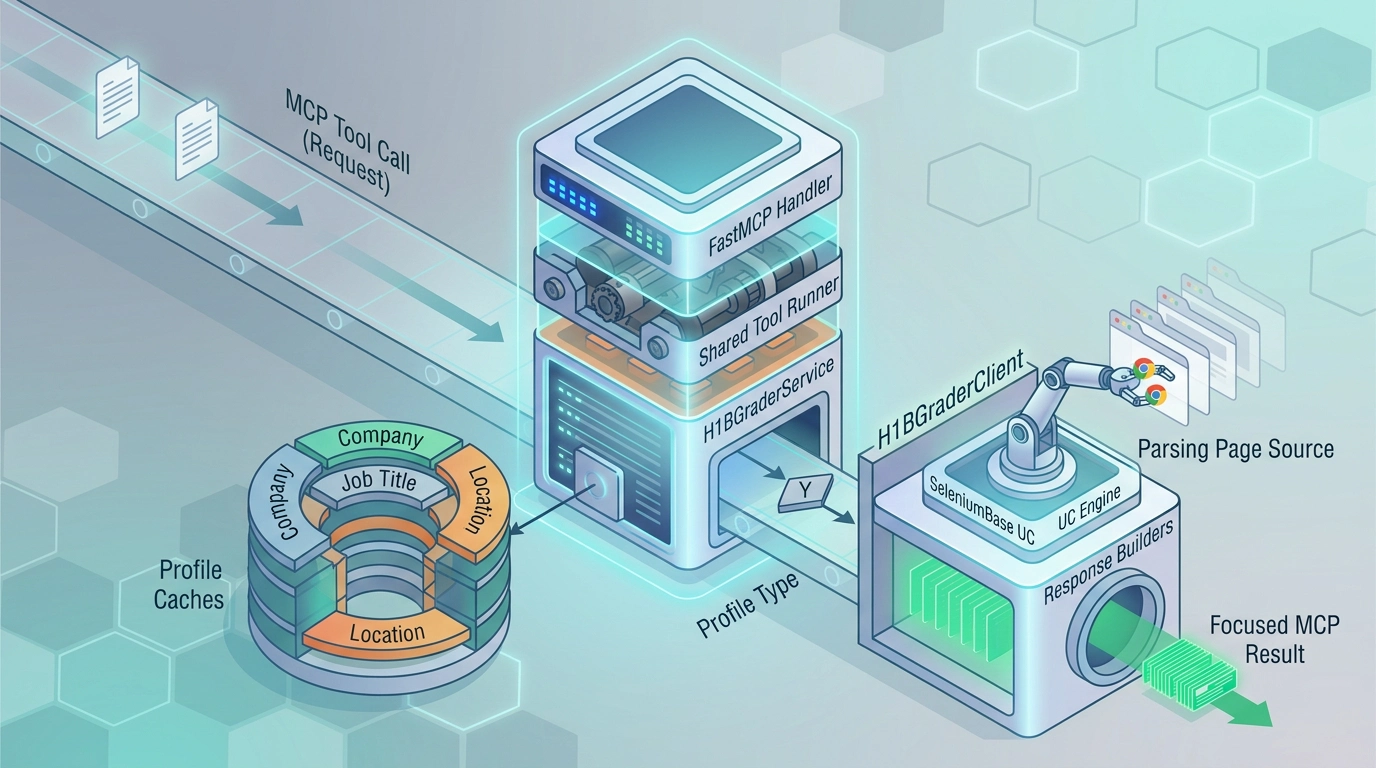
The live fetch is expensive. Once a profile has been parsed, answering questions from it is cheap. A company profile can cover sponsorship signal, role match, salaries, LCA and USCIS trends, grade, and job-title history. Job-title and city profiles work the same way.
So the server separates profile fetching from tool responses.
flowchart LR
    A[MCP tool call] --> B[FastMCP handler]
    B --> C[Shared tool runner]
    C --> D[H1BGraderService]

    D --> E{Profile type}
    E --> F[CompanyProfile cache]
    E --> G[JobTitleProfile cache]
    E --> H[LocationProfile cache]

    F --> I{Fresh cache hit?}
    G --> I
    H --> I

    I -->|yes| J[Load typed profile]
    I -->|no| K[H1BGraderClient]

    K --> L[SeleniumBase UC browser]
    L --> M[H1BGrader typeahead search]
    M --> N[Open required tabs]
    N --> O[Parse page source]
    O --> P[Write typed profile to cache]

    J --> Q[Response builders]
    P --> Q

    Q --> R[Focused MCP result]
The modules mirror that split:
h1b_mcp.h1bgraderowns the browser-backed lookup flow.h1b_mcp.parsersconverts H1BGrader HTML into structured profile data.h1b_mcp.cache.ProfileCachestores parsed profiles by normalized aliases.h1b_mcp.service.H1BGraderServicecoordinates cache reads, live fetches, and writes.h1b_mcp.responsesturns cached profile models into focused tool responses.h1b_mcp.toolsregisters the FastMCP tools for companies, job titles, and locations.
The tools do not scrape the website separately. They share one parsed profile and select the part that answers the current question.
The Browser Was the Hard Part
H1BGrader looks simple from the outside. Search for a company, open its profile, and read a few tables. Automating that flow took more work than the MCP server itself.
The first implementation used Playwright. It was the obvious place to start and
the API was good, but the first live probe opened a Cloudflare page with
Just a moment... instead of H1BGrader. Running a visible browser and keeping a
profile did not make the automated session reliable.
I switched to Patchright next. Since it keeps the Playwright API, the first change was almost just an import swap.
# first attemptfrom playwright.async_api import async_playwright# second attemptfrom patchright.async_api import async_playwrightPatchright got us closer, but it did not clear the H1BGrader challenge
consistently. We tried a persistent Chrome profile, opened a normal Chrome
window for manual verification, and reused the saved cf_clearance cookie on
the next lookup. The cookie was present and the automated session still got
challenged. Leaving the verification window open also locked the profile and
stopped the next browser from starting.
I tried regular Selenium after that, followed by SeleniumBase. Plain SeleniumBase still behaved like a normal automated browser. The version that finally worked was SeleniumBase with UC mode.
The final session setup is small. This is the code used by HomepageSession,
with the surrounding cleanup method omitted.
def __enter__(self) -> Any: self._settings.profile_dir.mkdir(parents=True, exist_ok=True) self._sb_context = SB( browser="chrome", uc=True, headless=True, user_data_dir=str(self._settings.profile_dir), timeout_multiplier=seleniumbase_timeout_multiplier(self._settings.timeout_ms), ) sb = self._sb_context.__enter__() try: self._open_homepage(sb) except BaseException: self._sb_context.__exit__(*sys.exc_info()) raise return sbdef _open_homepage(self, sb: Any) -> None: self._logger.info("Opening H1BGrader homepage.") sb.uc_open_with_reconnect(self._settings.base_url, reconnect_time=6) sb.sleep(2) raise_if_challenged(sb) self._logger.info("H1BGrader homepage loaded.")uc=True enables SeleniumBase’s UC mode, while uc_open_with_reconnect opens
the page and reconnects after the initial browser handshake. That combination
was able to get through the Cloudflare gate without bringing back the manual
verification loop.
Getting through the homepage was only the first step. H1BGrader uses typeahead search and renders some tables only after their tabs have been opened. Every lookup still has to run the full browser flow:
- Open the H1BGrader homepage.
- Select the company, job title, or city search tab.
- Type the query into the shared typeahead input.
- Click the selected suggestion.
- Open the profile tabs needed for that entity.
- Parse the resulting page source.
Company, job-title, and location pages use the same navigation code. The parts that change live in a typed lookup spec.
@dataclass(frozen=True)class H1BGraderLookupSpec(Generic[TProfile]): field_name: str search_type: str label: str path_pattern: Pattern[str] parse: Callable[[str, str | None, str, Any], TProfile] tabs_to_open: tuple[tuple[str, str], ...] = field(default_factory=tuple)COMPANY_LOOKUP_SPEC: H1BGraderLookupSpec[CompanyProfile] = H1BGraderLookupSpec( field_name="company_name", search_type="company", label="company", path_pattern=COMPANY_PROFILE_PATH_RE, parse=_parse_company_profile, tabs_to_open=( (COMPANY_SALARIES_TAB_SELECTOR, "salaries"), (COMPANY_GRADE_TAB_SELECTOR, "grade"), (COMPANY_JOB_TITLES_TAB_SELECTOR, "job titles"), ),)The browser client takes a query and a lookup spec, then returns a typed profile. It does not need separate search implementations for every page, and the rest of the server does not need to know which selector opens the salary tab.
Parsed Profiles, Not One-Off Answers
The cache stores source-backed profile objects rather than final answers.
For companies, the profile contains:
- LCA approval and denial counts
- LCA approval and denial rates
- USCIS approval and denial counts
- USCIS approval and denial rates
- H-1B salary rows
- sponsored job titles
- H1BGrader grade cards and grade insights
For job titles and locations, the aggregate profile contains:
- LCA trends
- approval-rate rows
- salary history
- top employers
Tool responses are then just projections over those profiles. For example,
get_company_uscis_trends returns the USCIS rows, while
check_company_job_sponsorship uses the same company profile but runs a local
job-title matcher over the sponsored title table.
One Databricks lookup can then support a chain of agent questions:
- is Databricks a sponsor?
- does it sponsor data science roles?
- what are the latest USCIS approvals?
- what titles has it filed LCAs for?
- what salary ranges show up in the H-1B data?
The expensive part happens once. The focused answers are cheap.
Tool Design
The tool surface is grouped by entity:
Company tools
- sponsorship signal
- company + job-title sponsorship context
- full company profile
- job titles
- LCA trends
- USCIS trends
- salaries
- grade
Job-title tools
- sponsorship signal across employers
- full job-title profile
- top employers
- LCA trends
- salary history
Location tools
- sponsorship signal across employers in a city
- full city profile
- top employers
- LCA trends
- salary history
The docstrings are written from the agent’s perspective, not as internal Python documentation. A tool description like “Use to inspect an employer’s annual USCIS approval and denial history” is more useful to an agent than “returns CompanyUSCISTrendsResult.” The schema already tells the client the return type. The description should help decide when to use the tool.
Failure Behavior
The server avoids pretending when H1BGrader blocks lookup or human verification appears. Browser blocks, missing typeahead suggestions, and unexpected navigation failures surface as MCP tool errors with clear messages.
A blocked lookup cannot quietly become “no sponsorship evidence.” Those are different states. The server returns parsed evidence or tells the caller that it could not fetch the data reliably.
Packaging and Usage
The project is published on PyPI and can run through uvx.
Install uv first so
uvx is available.
uvx h1b-mcp@latestFor Codex, the MCP config looks like this.
[mcp_servers.h1b]command = "uvx"args = ["h1b-mcp@latest"]env = { UV_HTTP_TIMEOUT = "300" }tool_timeout_sec = 300The timeout is not decorative. Browser-backed lookups can take longer than a plain API call, especially on the first run when SeleniumBase prepares the browser driver.
The Tool in Action
This is a real lookup from Codex asking whether Databricks sponsors Data Scientists.
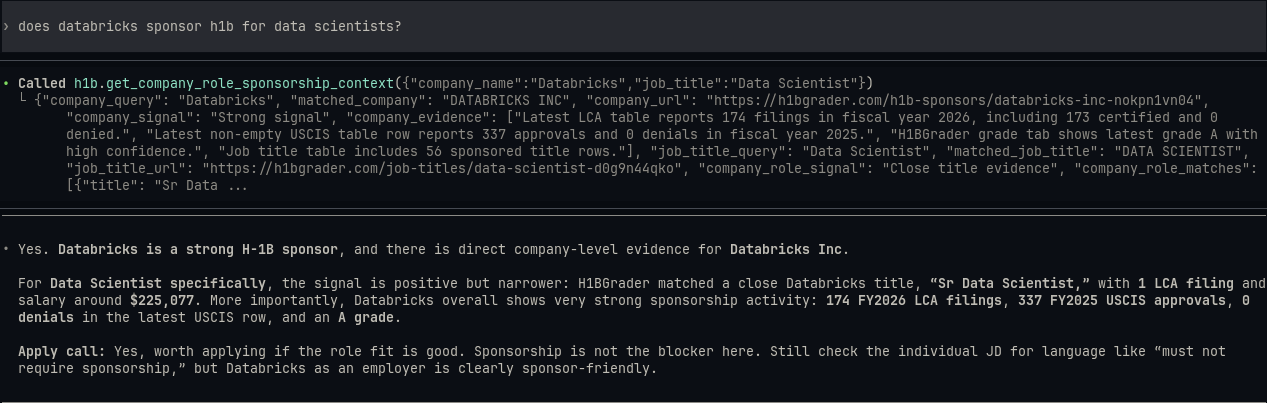
The agent calls get_company_role_sponsorship_context with the company and job
title. The tool returns the company-level signal, recent LCA and USCIS evidence,
the closest sponsored title, and salary data. Codex then turns that payload into
an apply recommendation while keeping the individual job description as the
final check.
What This Enables
Behind MCP, the sponsorship check becomes part of the larger application decision. The agent can read a role, check the company and title, then decide whether the evidence is strong enough to justify tailoring.
An answer can be more nuanced than “yes” or “no.”
Databricks has strong company-level H-1B evidence. For Data Scientist specifically, the closest company title match is Sr Data Scientist with LCA activity, and the broader company profile shows recent LCA and USCIS approval rows. Sponsorship is not the blocker, but still check the individual job description for role-specific language.
This was the missing half of the decision. The resume repo gives the agent my
background, projects, and the roles I want. h1b-mcp tells it whether an
opportunity has enough sponsorship evidence to be worth my time.
I still read the posting carefully. I just reach it with better evidence now.