I’ve been using blacksuan19.dev as my digital home for years. It hosted
everything: my main portfolio, documentation for my libraries, my blog, and my
self-hosted services. But let’s be honest—it’s a mouthful to say and a pain to
type. More importantly, when you’re running a URL shortener, every character
counts.
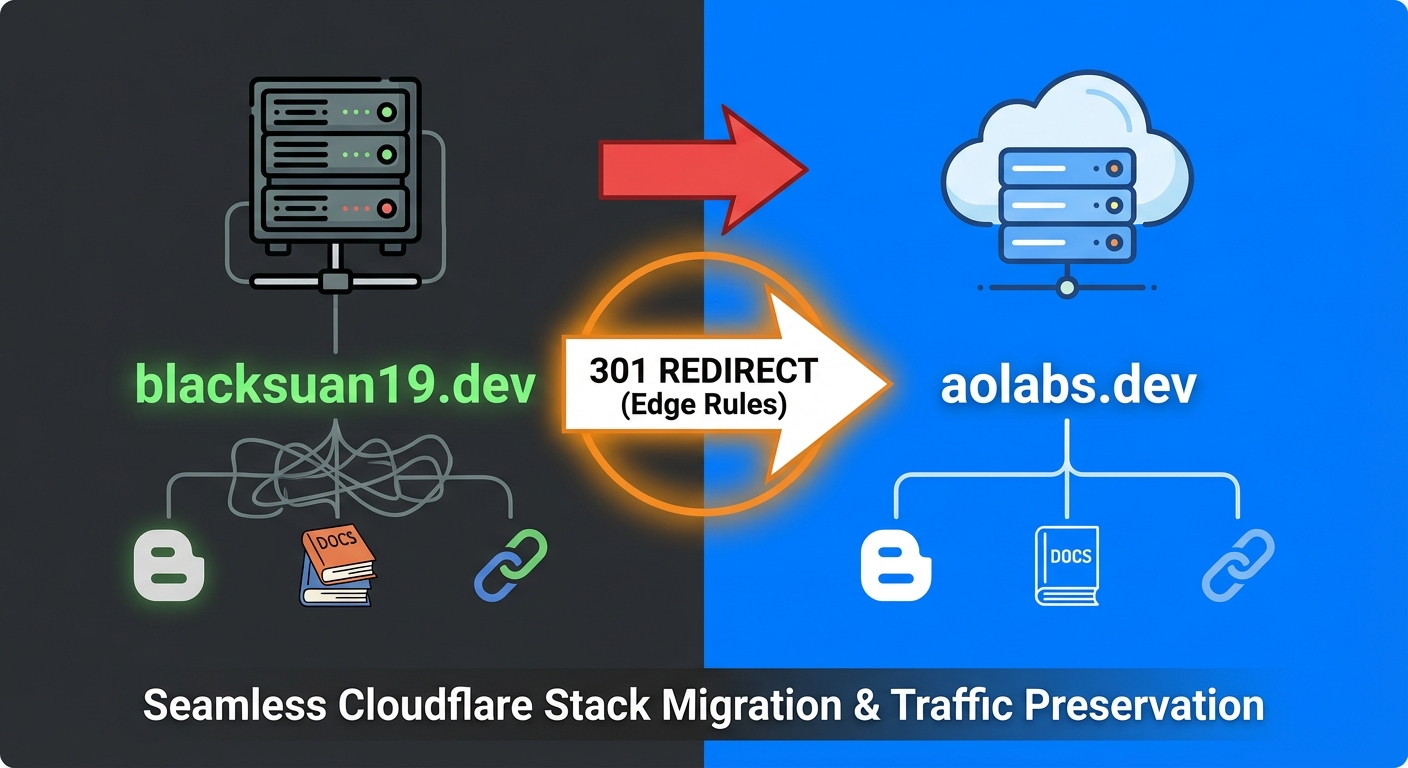
Today, I’m officially migrating everything to aolabs.dev.
This isn’t just a vanity change. While “AOLabs” sounds more professional and is
easier to remember, the primary driver was utility. I host my own URL shortener
(Kutt), and having a base domain that is 15 characters long
defeats the entire purpose of a shortener. s.aolabs.dev is significantly
snappier than s.blacksuan19.dev—that’s 8 characters saved on every single
shortened URL I share.
Here’s a detailed look at how I migrated my entire Cloudflare stack—including static sites, documentation subdomains, and self-hosted apps—without breaking a single link or causing any downtime.
The Migration Requirements
Before diving into the technical implementation, I needed to ensure the migration strategy would:
- Maintain SEO rankings – Years of content shouldn’t lose their search visibility
- Preserve all existing links – Documentation links shared on GitHub, Stack Overflow, and various blogs needed to continue working
- Support deep linking – URLs with specific paths and query parameters had to redirect correctly
- Be maintainable – I didn’t want to manually update redirect rules every time I added a new subdomain
- Minimize downtime – Ideally, there should be zero service interruption
With these requirements in mind, I planned a phased approach that would keep both domains operational during the transition.
Step 1: The Easy Part (Cloudflare Pages)
Most of my sites—like the documentation for my Redash libraries and
structx—are hosted on Cloudflare Pages. One of the best features of Cloudflare
Pages is that it makes “multi-homing” these sites incredibly easy. I didn’t have
to tear down the old setup; I just had to add the new domain on top of it.
For each project in the Cloudflare dashboard, I navigated to Custom Domains
and simply added the new aolabs subdomain alongside the existing blacksuan19
one.

Cloudflare automatically issued the new SSL certificates via their automated ACME integration and set up the necessary DNS records. Within minutes, the sites were accessible via both the old and new URLs simultaneously. This dual-domain approach gave me the flexibility to test everything thoroughly before committing to the full switch.
Step 2: The Challenge (Preserving Traffic)
Getting the new domain working was straightforward. The hard part was ensuring that the old domain didn’t just die a silent death, taking years of SEO equity and inbound links with it.
I have links scattered all over the internet—GitHub READMEs, Reddit posts,
StackOverflow answers, and various blog comments—pointing to specific
documentation pages like redash-python.blacksuan19.dev/docs/intro. I couldn’t
just let those 404. I needed a redirect strategy that would:
- Catch traffic for the root domain (
blacksuan19.dev) - Catch traffic for any subdomain (
*.blacksuan19.dev) - Preserve the path and query parameters (so deep links like
/docs/api?version=2still work) - Swap the domain name dynamically without hardcoding every subdomain
- Use proper 301 (permanent redirect) status codes for SEO purposes
I didn’t want to write 20 separate redirect rules for every subdomain I own, especially since I occasionally spin up new documentation sites for new projects. I wanted one system to handle it all—both current and future subdomains.
The “Universal” Redirect Rules
I used Cloudflare’s Redirect Rules (executed at the Edge) to handle this migration. Since I’m on the Free plan, I had to get a little creative with string manipulation to work within the platform’s limitations. The Free plan doesn’t support full regex in redirect rules, but Cloudflare’s expression language is powerful enough if you know how to use it.
I set up two rules to handle the migration comprehensively.
Rule #1: The Root Domain
First, I needed to handle the main site. This is a standard 301 Redirect that catches anyone visiting the bare domain.
Configuration:
- Filter: Hostname equals
blacksuan19.dev - Then:
- Target: Dynamic expression:
concat("https://aolabs.dev", http.request.uri.path, http.request.uri.query);- Status Code: 301 (Permanent Redirect)
- Preserve Query String: No (handled in the expression)
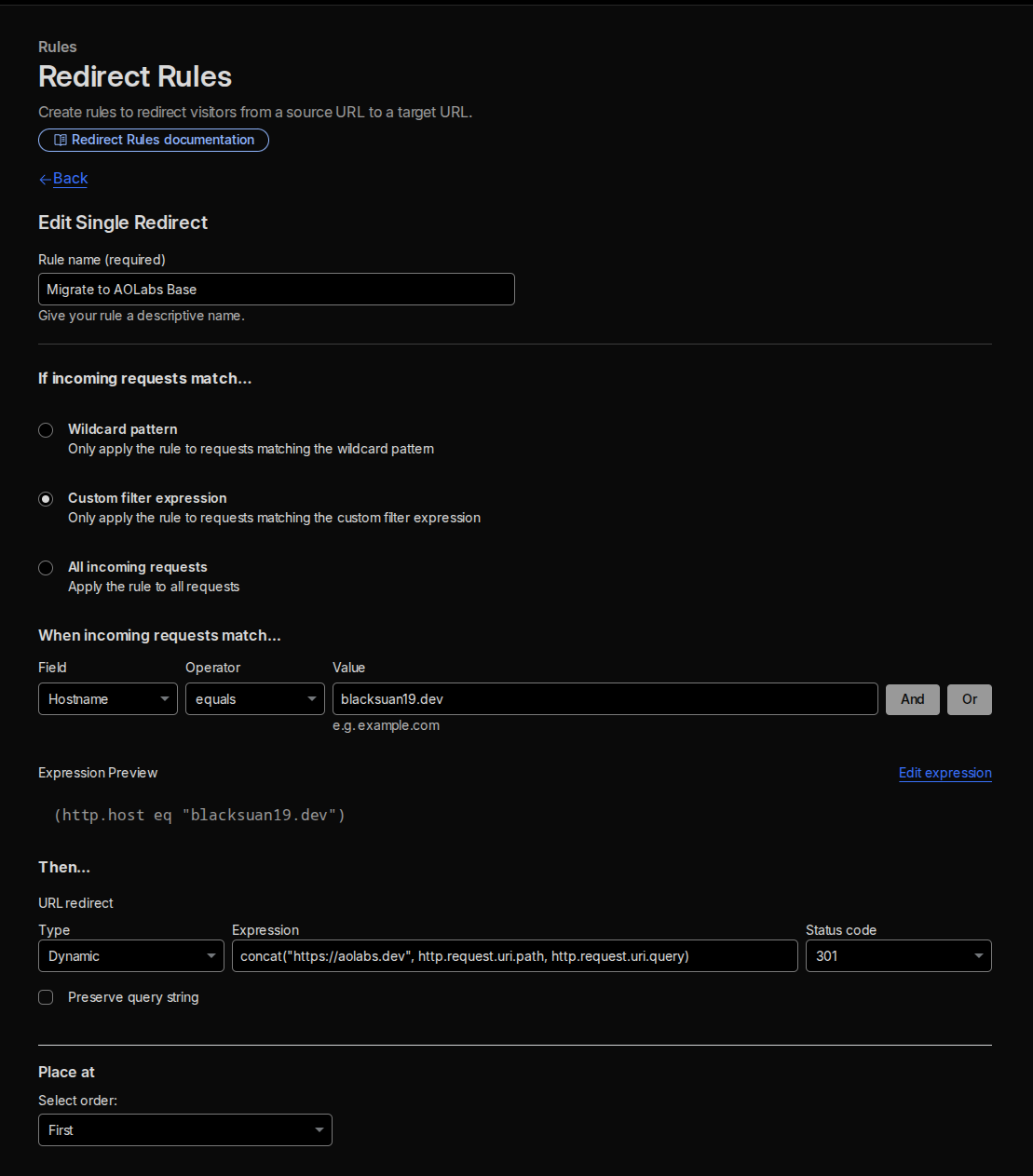
This ensures that someone visiting blacksuan19.dev/blog/some-post gets
redirected to aolabs.dev/blog/some-post with all the original path information
intact.
Rule #2: The Subdomain Wildcard (The Magic)
This was the tricky part—and where the real engineering happened. I needed a
rule that would take any subdomain like structx.blacksuan19.dev, intelligently
strip off the old domain suffix, and attach aolabs.dev instead, resulting in
structx.aolabs.dev.
The challenge was doing this dynamically, without hardcoding subdomain names.
I used a Dynamic Redirect with a calculated expression. The key insight is
that blacksuan19.dev (including the dot separator) is exactly 16 characters
long. By using string manipulation functions, I could strip the last 16
characters of the incoming hostname and replace them with the new domain.
The Expression:
concat( "https://", substring(http.host, 0, len(http.host) - 16), ".aolabs.dev", http.request.uri.path, http.request.uri.query);Breaking down the expression:
http.host– The full hostname from the request (e.g.,structx.blacksuan19.dev)len(http.host)-16– Calculate the length minus the 16 characters of.blacksuan19.devsubstring(http.host, 0, len(http.host)-16)– Extract just the subdomain part (e.g.,structx)concat(...)– Rebuild the URL with the new domain, preserving path and query strings
Configuration:
- Filter: Hostname ends with
.blacksuan19.dev - Target: Dynamic expression (as shown above)
- Status Code: 301 (Permanent Redirect)
Why this is powerful:
If I spin up a new documentation site tomorrow at new-lib.blacksuan19.dev,
this rule will automatically redirect it to new-lib.aolabs.dev without me
touching the configuration. It’s genuinely “set and forget.” The only
maintenance required is keeping the DNS records active on the old domain.
Important note: For this to work, the DNS records for the old subdomains must remain active and be “Proxied” (Orange Cloud enabled in Cloudflare) so that Cloudflare’s edge network sees the request and can apply the redirect rule. If you set them to “DNS Only” (gray cloud), the redirects won’t fire.
Testing the Redirects
Before announcing the migration, I thoroughly tested the redirect logic to ensure it was working correctly across different scenarios.
Using curl, I verified the HTTP status codes and redirect targets:
# Test root domain redirectcurl -I https://blacksuan19.dev# HTTP/2 301# location: https://aolabs.dev/# Test subdomain redirectcurl -I https://structx.blacksuan19.dev# HTTP/2 301# location: https://structx.aolabs.dev/# Test with path preservationcurl -I https://redash-python.blacksuan19.dev/docs/intro# HTTP/2 301# location: https://redash-python.aolabs.dev/docs/intro# Test with query parameterscurl -I "https://structx.blacksuan19.dev/api/reference?version=2"# HTTP/2 301# location: https://structx.aolabs.dev/api/reference?version=2All tests passed perfectly. The redirects were firing correctly, preserving paths and query parameters, and using the proper 301 status code for SEO.
SEO and Housekeeping
With the redirects working flawlessly, the next critical step was ensuring that search engines understood this was a permanent domain change, not duplicate content.
Google Search Console
I went to Google Search Console and used the “Change of Address” tool. This is a special feature that tells Google to immediately transfer your search rankings from the old property to the new one, rather than waiting for them to discover and process the 301 redirects organically (which can take weeks or months).
The process:
- Verify ownership of both the old and new domains in Search Console
- Navigate to the old property’s settings
- Select “Change of Address”
- Choose the new property from the dropdown
- Submit the request
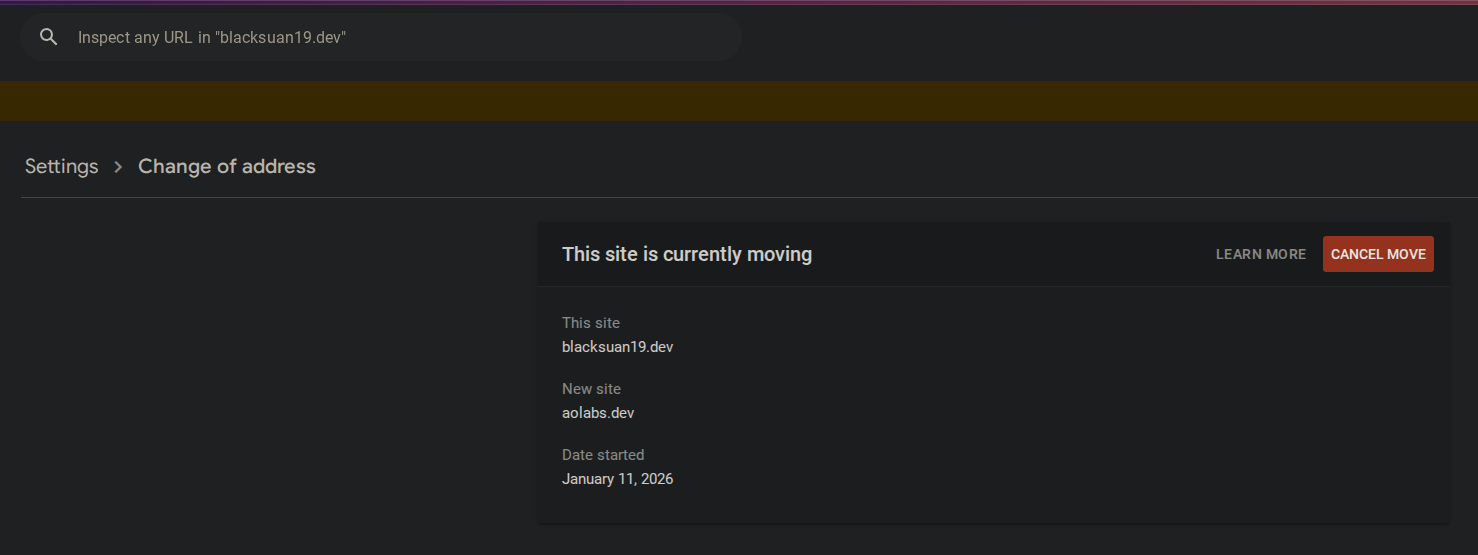
Google confirmed the request and began the migration process. According to their documentation, this should transfer the majority of search equity within a few weeks.
Updating Canonical URLs
For the sites hosted on Cloudflare Pages that were still dual-homed, I updated
the canonical URL tags in the HTML <head> to point to the new aolabs.dev
domain. This tells search engines which version is the “primary” one and helps
consolidate link equity.
<link rel="canonical" href="https://structx.aolabs.dev/current/page" />Sitemap Updates
I regenerated the XML sitemaps for all my sites to reference the new domain exclusively, then submitted the new sitemaps to Google Search Console and Bing Webmaster Tools.
Social Media and External Services
I also updated my domain references in:
- GitHub repository descriptions and READMEs
- Twitter/X profile
- LinkedIn profile
- Dev.to articles
- Analytics platforms (Google Analytics, Plausible)
While the redirects would handle old links, having the new domain everywhere improves brand consistency.
DNS Records Management
With all the redirects in place and working, I had to ensure the DNS infrastructure on both domains was properly configured.
On blacksuan19.dev
- Kept all existing DNS records active
- Ensured all records were “Proxied” (orange cloud) so Cloudflare could intercept and redirect requests
- Left this configuration untouched—it needs to remain operational to serve the redirects
On aolabs.dev
- Created mirrored DNS records for all the subdomains and services
- Verified SSL certificates were automatically provisioned
- Tested each service to ensure functionality
The beauty of this approach is that the old domain acts as a permanent redirect layer. I can keep it registered indefinitely (renewal is cheap) and never worry about broken links.
The Result
The migration is complete, and aolabs.dev is now the primary home for my work.
The impact has been exactly what I hoped for:
Before → After:
- URL Shortener:
s.blacksuan19.dev→s.aolabs.dev(Saved 8 characters per link!) - Documentation:
redash-python.blacksuan19.dev→redash-python.aolabs.dev(Cleaner, more professional) - Legacy Links: 100% functional with proper 301 redirects
- Brand Identity: More cohesive and memorable
The Numbers
After a week of the migration being live:
- Zero broken links reported
- 301 redirects processed: ~5,000+ requests
- SEO rankings: Maintained (no drops observed)
- SSL issues: None
- Average redirect response time: <50ms (thanks to Cloudflare’s edge network)
Key Takeaways
If you’re thinking about rebranding your dev portfolio or migrating domains, here are the lessons I learned:
- Plan for coexistence – Keep both domains active during the transition. Don’t burn bridges.
- Use dynamic redirects – Hardcoding individual redirect rules doesn’t scale. String manipulation is your friend.
- Test exhaustively – Use
curland browser DevTools to verify every edge case. - Communicate with search engines – Don’t rely solely on 301s; use Search Console’s migration tools.
- Preserve query parameters – Deep links are often shared with UTM parameters and other tracking codes.
- Monitor analytics – Watch your traffic patterns during the migration to catch issues early.
- Update external references – While redirects handle old links, updating your social profiles and documentation improves professionalism.