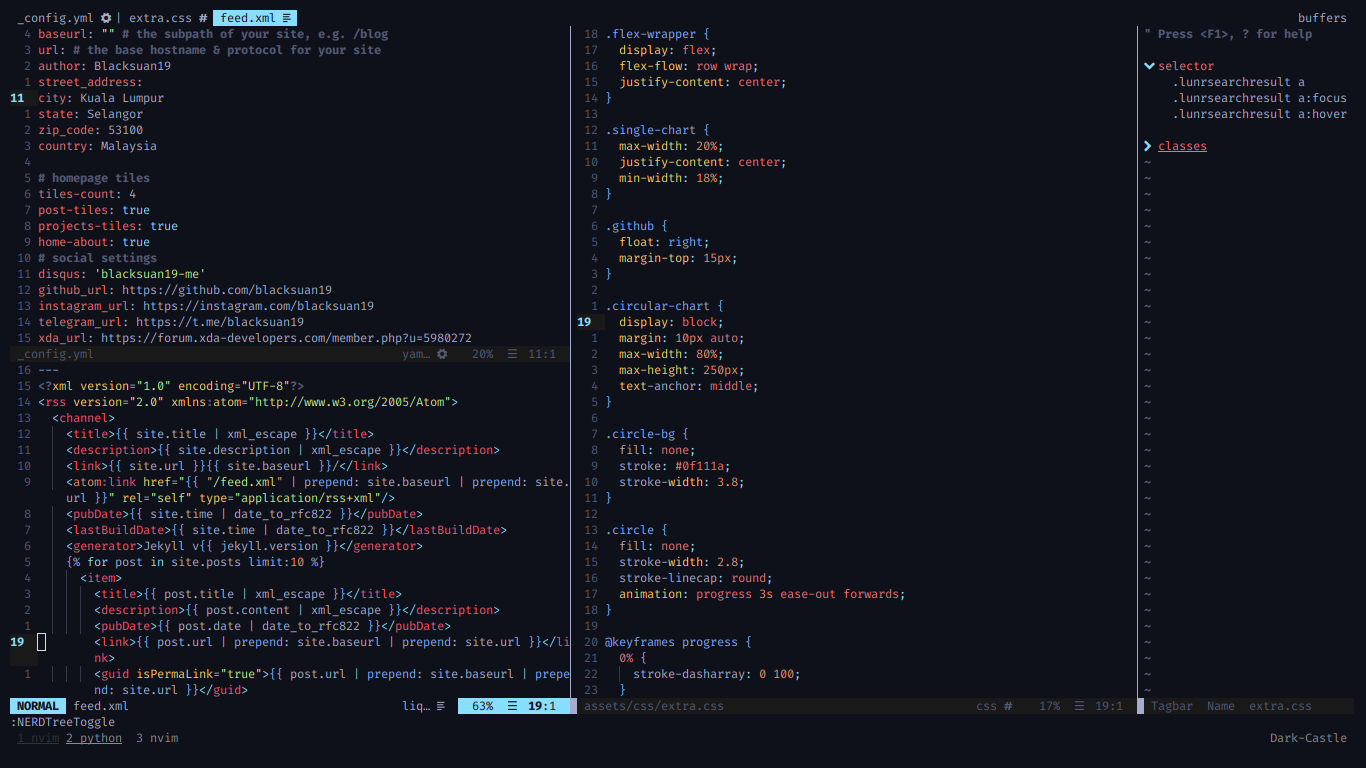
In my last post i went over my history of editors and the good, the bad and the ugly about finally switching to vim, now its time to talk more about dem configs boi. My configs are a heavily modified version from Optixal’s Neovim Init.vim, i have replaced some of the plugs and added my own bindings and auto completion plugins.
Plugin Management
for plugins i left vim-plug as it is because well its great, gets the job done and doesn’t really interfere in any way, yes i do use a lot of plugins, however most of them i consider necessary for a great IDE experience, out of the box most of these functions are missing or hidden, i have added a comment for each plugin explaining what it does.
" ================= looks and GUI stuff ================== "Plug 'vim-airline/vim-airline' " airline status barPlug 'vim-airline/vim-airline-themes' " airline themesPlug 'ryanoasis/vim-devicons' " powerline like icons for NERDTreePlug 'junegunn/rainbow_parentheses.vim' " rainbow paranthesisPlug 'hzchirs/vim-material' " material color themesPlug 'junegunn/goyo.vim' " zen modePlug 'amix/vim-zenroom2' " more focus in zen mode" ================= Functionalities ================= "" autocompletion using ncm2 (much lighter and faster than coc)Plug 'ncm2/ncm2'Plug 'roxma/nvim-yarp'Plug 'ncm2/ncm2-bufword'Plug 'ncm2/ncm2-path'Plug 'filipekiss/ncm2-look.vim'Plug 'fgrsnau/ncm-otherbuf'Plug 'fgrsnau/ncm2-aspell'Plug 'ncm2/ncm2-tern', {'do': 'npm install'}Plug 'ncm2/ncm2-pyclang'Plug 'davidhalter/jedi-vim'Plug 'ncm2/ncm2-jedi'Plug 'ncm2/ncm2-vim' | Plug 'Shougo/neco-vim'Plug 'ncm2/ncm2-ultisnips'Plug 'ncm2/ncm2-html-subscope'Plug 'ncm2/ncm2-markdown-subscope'" markdownPlug 'jkramer/vim-checkbox', { 'for': 'markdown' }Plug 'dkarter/bullets.vim' " markdown bullet lists" searchPlug 'wsdjeg/FlyGrep.vim' " project wide searchPlug 'junegunn/fzf', { 'dir': '~/.fzf', 'do': './install --all' }Plug 'junegunn/fzf.vim' " fuzzy search integration" snippetsPlug 'honza/vim-snippets' " actual snippetsPlug 'SirVer/ultisnips' " snippets and shit" visualPlug 'majutsushi/tagbar' " side bar of tagsPlug 'scrooloose/nerdtree' " open folder treePlug 'jiangmiao/auto-pairs' " auto insert other paranthesis pairbPlug 'alvan/vim-closetag' " auto close html tagsPlug 'Yggdroot/indentLine' " show indentation linesPlug 'chrisbra/Colorizer' " show actual colors of color codesPlug 'google/vim-searchindex' " add number of found matching search items" languagesPlug 'sheerun/vim-polyglot' " many languages supportPlug 'tpope/vim-liquid' " liquid language support" otherPlug 'Chiel92/vim-autoformat' " an actually good and light auto formatterPlug 'tpope/vim-commentary' " better commentingPlug 'rhysd/vim-grammarous' " grammer checkerPlug 'tpope/vim-sensible' " sensible defaultsPlug 'lambdalisue/suda.vim' " save as sudoPlug '907th/vim-auto-save' " auto save changesPlug 'mhinz/vim-startify' " cool start up screensuperior auto completion
the original Optical configs used deoplete for completion which is kinda heavy and slow (this laptop is running an 10 APU) for this machine, i tried coc which was good and super responsive but also still heavy especially with python files (jedi) i had many other options to pick from but i choose ncm2 because its fully written in vim script and was meant for Nvim so its a native environment for it, and it works pretty good so far the pop-up comes up pretty fast and the snippets work as intended. the good thing is i didn’t really need to do a very extensive setup because well this works by default i had to modify is the mapping and other simple stuff which i could’ve used another plugin for.#### Visual changes:
just as usual it has to be material ocean themed, and vim being a popular editor its already there and no need to reinvent the wheel, kaicataldo’s themes include it and you can easily set it up, other visual changes include a modified air line and a minimal NERDTree.
let g:material_style='oceanic'set background=darkcolorscheme vim-materiallet g:airline_theme='material'highlight Pmenu guibg=white guifg=black gui=boldhighlight Comment gui=boldhighlight Normal gui=nonehighlight NonText guibg=noneautocmd ColorScheme * highlight VertSplit cterm=NONE ctermfg=Green ctermbg=NONEnifty tricks
these are Vim built in options that are not set up by default or are set to not so good defaults, i found most of these while trying to do a specific task, i used to use mswin behavior (makes Nvim behave more like a regular text editor) but now i don’t think i need it anymore, still haven’t mastered the moved as i did with good ol’ plasma.
" ==================== general config ======================== "set termguicolors " Opaque Backgroundset mouse=a " enable mouse scrollingset clipboard+=unnamedplus " use system clipboard by default" ===================== Other Configurations ===================== "filetype plugin indent on " enable indentationsset tabstop=4 softtabstop=4 shiftwidth=4 expandtab smarttab autoindent " tab key actionsset incsearch ignorecase smartcase hlsearch " highlight text while seachingset list listchars=trail:»,tab:»- " use tab to navigate in list modeset fillchars+=vert:\▏ " requires a patched nerd font (try furaCode)set wrap breakindent " wrap long lines to the width sset by twset encoding=utf-8 " text encodingset number " enable numbers on the leftset number relativenumber " relative numbering to current line (current like is 0 )set title " tab title as file fileset conceallevel=2 " set this so we womt break indentation pluginset splitright " open vertical split to the rightset splitbelow " open horizontal split to the bottomset tw=80 " auto wrap lines that are longer than thatset emoji " enable emojislet g:indentLine_setConceal = 0 " actually fix the annoying markdown links conversionau BufEnter * set fo-=c fo-=r fo-=o " stop annying auto commenting on new linesset undofile " enable persistent undoset undodir=~/.nvim/tmp " undo temp file directoryset ttyfast " faster scrollingset lazyredraw " faster scrollingNERDTree
these configs are the best, i kanged the icons from some repo which i can’t remember, it includes minimal ui (hides the top help text and other stuff), and ignores .git and Jekyll build files by default. It also quites when you open a file so you can immediately focus on the file
let NERDTreeShowHidden=1let NERDTreeShowLineNumbers=0let g:NERDTreeDirArrowExpandable = ''let g:NERDTreeDirArrowCollapsible = ''let NERDTreeQuitOnOpen = 1let NERDTreeMinimalUI = 1let NERDTreeDirArrows = 1let g:NERDTreeIgnore = [\ '\.vim$',\ '\~$',\ '.git',\ '_site',\]Airline
airline is a fantastic status bar that shows important information like the language, encoding and current mode you’re in. my airline configs are pretty simple as well, the only big difference compared to the defaults is the added current line and percentage of the file at the right of the bar, also spell check
" Airlinelet g:airline_powerline_fonts = 0let g:airline#themes#clean#palette = 1call airline#parts#define_raw('linenr', '%l')call airline#parts#define_accent('linenr', 'bold')let g:airline_section_z = airline#section#create(['%3p%% ',\ g:airline_symbols.linenr .' ', 'linenr', ':%c '])let g:airline_section_warning = ''let g:airline#extensions#tabline#enabled = 1let g:airline#extensions#tabline#fnamemod = ':t' " show only file name on tabsOther great features
- auto line indentation
- display tags via tag bar
- FZF integration
- Grammer checking via Grammerous
- Snippets via Ultisnips
- startify when no buffer is open
- open images via feh
Key Mappings
The default key maps are ok but they’re missing some essential things like block
selection without going back to visual mode, fast split switching and split
rotation, so i made my own bindings for all these, some are from nvim help and
others are scattered from the web.
i also fixed the annoying block selection
will copy the selected text to the clipboard by using the void register for
delete operations, this way deleting a visual block will just delete it without
adding it to the clipboard.
" use a different buffer for ddnnoremap d "_dvnoremap d "_d" emulate windows copy, cut behaviornoremap <LeftRelease> "+y<LeftRelease>noremap <C-c> "+y<CR>noremap <C-x> "+d<CR>" switch between splits using ctrl + {h,j,k,l}tnoremap <C-h> <C-\><C-N><C-w>htnoremap <C-j> <C-\><C-N><C-w>jtnoremap <C-k> <C-\><C-N><C-w>ktnoremap <C-l> <C-\><C-N><C-w>linoremap <C-h> <C-\><C-N><C-w>hinoremap <C-j> <C-\><C-N><C-w>jinoremap <C-k> <C-\><C-N><C-w>kinoremap <C-l> <C-\><C-N><C-w>lnnoremap <C-h> <C-w>hnnoremap <C-j> <C-w>jnnoremap <C-k> <C-w>knnoremap <C-l> <C-w>l" select text via ctrl+shift+arrows in insert modeinoremap <C-S-left> <esc>vbinoremap <C-S-right> <esc>veOther shortcuts
- F3 for nerdtree
- f4 for tagbar
- f5 to rotate splits
- maybe more
and thats all from me, these settings do almost everything i need from an IDE and keep me focused on the actual writing/coding part, and finally you can checkout the file configuration file in my dotfiles repo.